> ## Documentation Index
> Fetch the complete documentation index at: https://docs.multex.tech/llms.txt
> Use this file to discover all available pages before exploring further.
# Roblox Roles
> Set up automatic role synchronization with your Roblox group
## What are Roblox Roles?
Roblox Roles link Discord roles to Roblox group ranks. When someone promotes, demotes, or gives a specific rank through Discord commands or direct Discord role management, the bot will automatically rank the target to the linked Roblox group rank.
## Step 1: Access Role Configuration
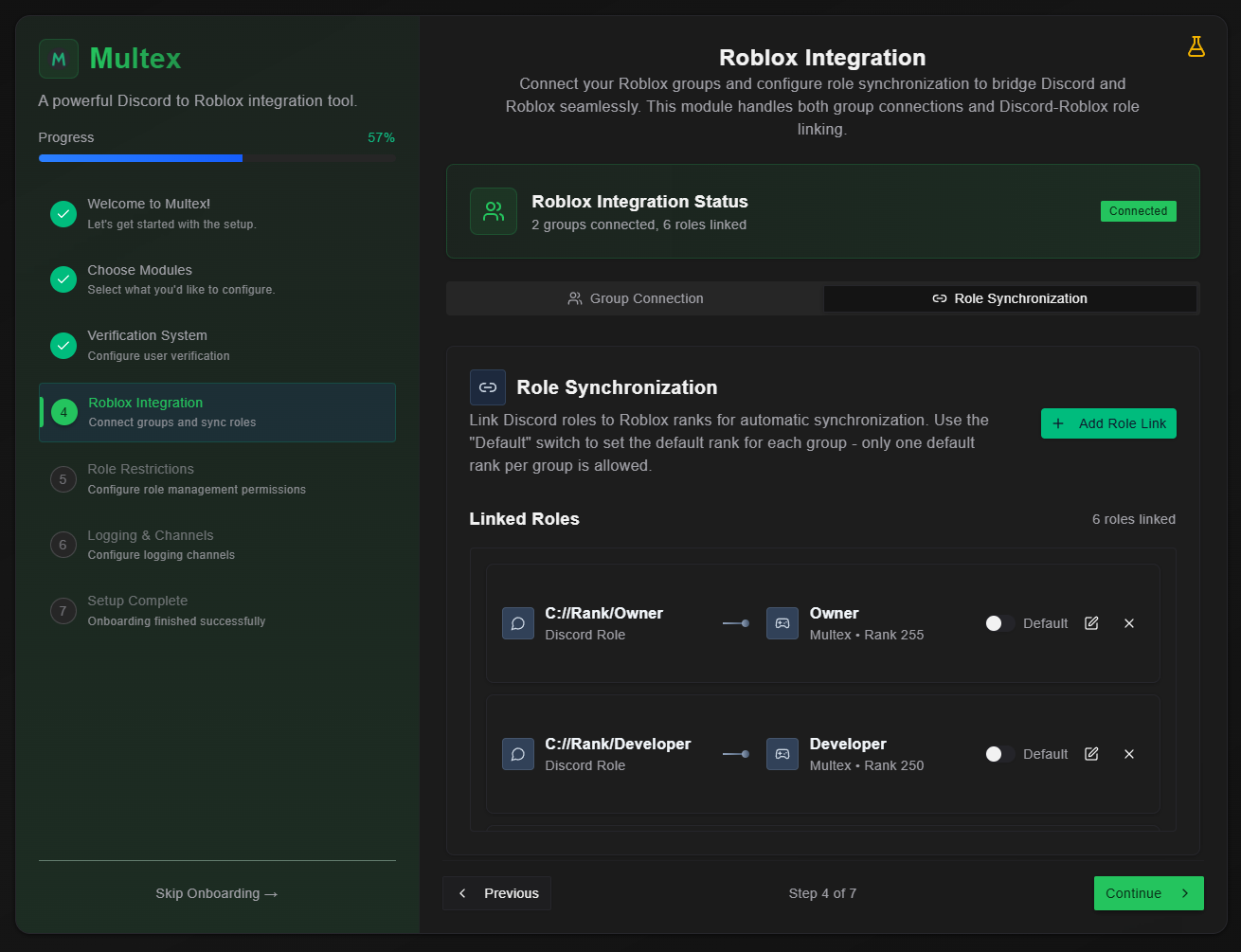 From your onboarding dashboard, select **Roblox Integration's Role Synchronization tab** to begin linking roles to ranks.
## Step 2: Create Role Links
From your onboarding dashboard, select **Roblox Integration's Role Synchronization tab** to begin linking roles to ranks.
## Step 2: Create Role Links
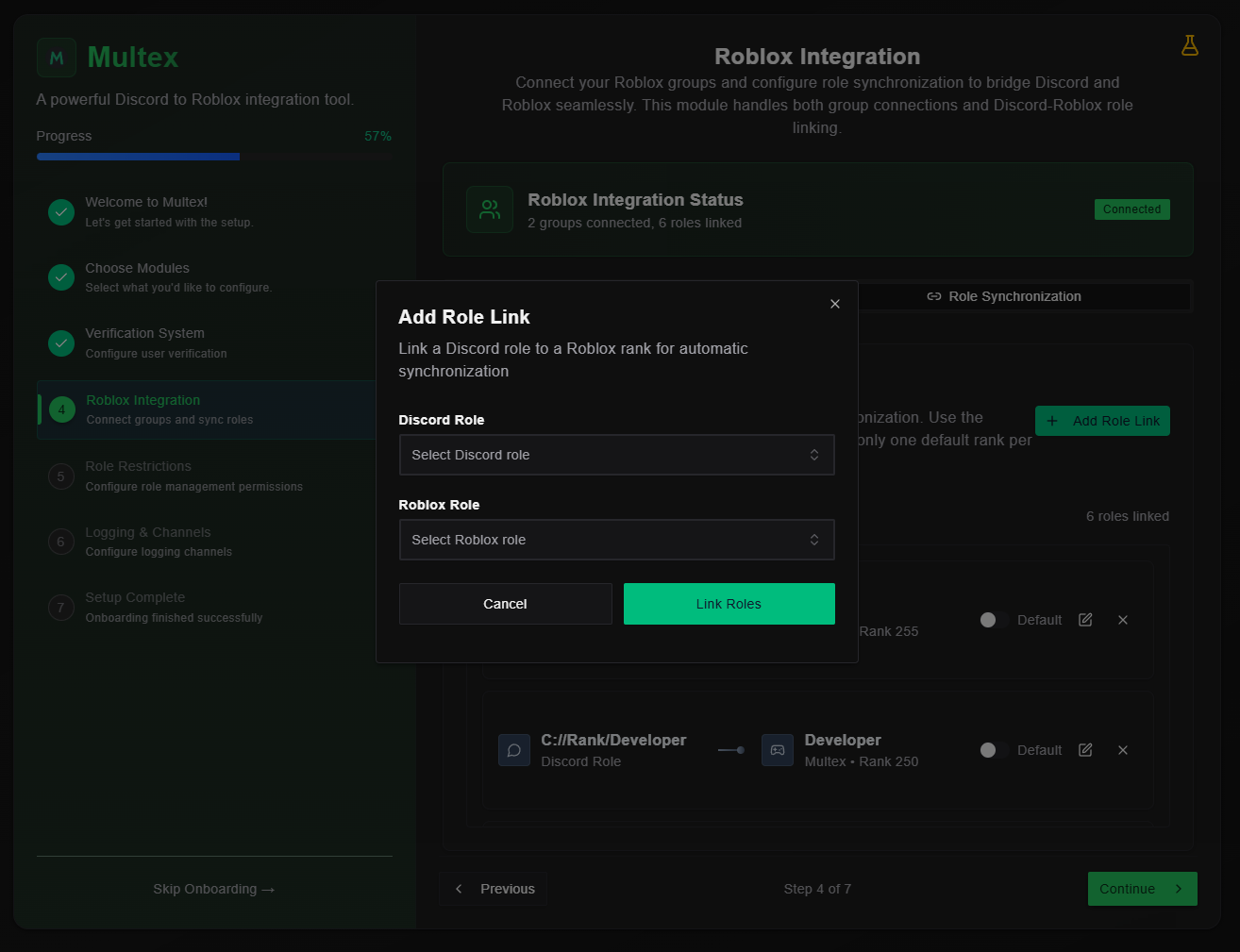 If you do not see any Roblox ranks to select, that means you did not connect a Roblox group to your Discord server. Go to [Roblox Integration](/v2/onboarding/roblox-integration) to setup a group for your Discord server.
1. **Select Discord Role** - Choose the role you want to link
2. **Select Roblox Rank** - Choose the corresponding group rank
3. **Click "Link Roles"** to save
It's really that easy. Repeat for all roles you want to link.
## Step 3: The Default Binding
By now you should have noticed a switch with the word "Default" to the right of it. This setting is limited to 1 binding per Roblox group. Essentially what this does is it allows the bot to understand which Roblox rank and Discord role to initially give users who join through the `/recruit` command.
An example would be to set the Private binding as the default binding. So whenever users within that server use the `/recruit` command, the new recruit will be given the Private Discord role and Private Roblox rank.
## Step 4: Test Role Synchronization
Try to promote or demote someone through bot commands like `/promote` or `/demote`. Then check if they were roled properly in Discord and ranked properly in your Roblox group.
Binding heirarchy takes after Roblox rank IDs from their respective group.
If you do not see any Roblox ranks to select, that means you did not connect a Roblox group to your Discord server. Go to [Roblox Integration](/v2/onboarding/roblox-integration) to setup a group for your Discord server.
1. **Select Discord Role** - Choose the role you want to link
2. **Select Roblox Rank** - Choose the corresponding group rank
3. **Click "Link Roles"** to save
It's really that easy. Repeat for all roles you want to link.
## Step 3: The Default Binding
By now you should have noticed a switch with the word "Default" to the right of it. This setting is limited to 1 binding per Roblox group. Essentially what this does is it allows the bot to understand which Roblox rank and Discord role to initially give users who join through the `/recruit` command.
An example would be to set the Private binding as the default binding. So whenever users within that server use the `/recruit` command, the new recruit will be given the Private Discord role and Private Roblox rank.
## Step 4: Test Role Synchronization
Try to promote or demote someone through bot commands like `/promote` or `/demote`. Then check if they were roled properly in Discord and ranked properly in your Roblox group.
Binding heirarchy takes after Roblox rank IDs from their respective group.
Ex. Group has ranks 1, 2, 5.
Target user is at rank 2.
Use `/promote` on the target user and they will be promoted to rank 5.